A gamified way to reclaim focus from distracting apps
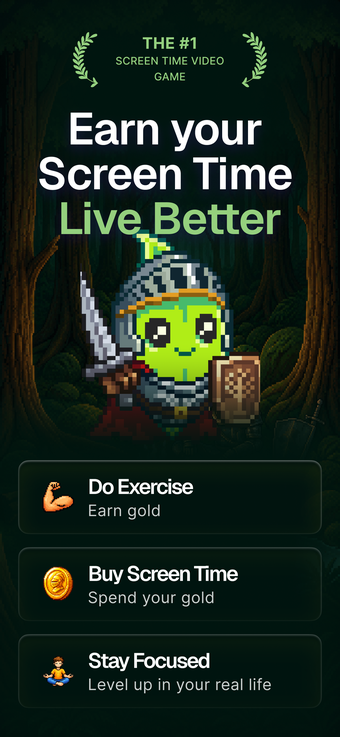
Journey: Screen Time Control, from Brain Nourishment LLC, is a gamified iPhone and iPad app designed to curb mindless scrolling and restore focused hours. It converts offline activity into conditional access to distracting software, using in-app rewards that gate device use until goals are completed. The app combines visual accountability, scheduled deep-work blocks, and usage analytics to shape habits and provide habit coaching. It targets Gen Z, students, and early-career professionals seeking a playful, habit-driven alternative to passive trackers.
What is Journey designed to change in daily device behavior?
Journey pivots device management away from passive monitoring toward a reward-driven workflow. Users receive daily quests and earn in-app currency, such as gold or crowns, by completing real-world tasks; those rewards are spent to unlock distracting apps. Photo verification authenticates completed tasks and a mascot called Focus Buddy provides immediate visual feedback on your digital health, encouraging repeated real-world actions rather than step counting alone.
How does the app structure a typical work or study session?
The app organizes attention through a clear loop of goal, verification, and timed access. A typical flow includes:
- morning quests issued to set daily priorities,
- complete a task and upload a photo to claim rewards,
- spend rewards to unlock specified apps,
- enter strict focus sessions for uninterrupted work. Progress tracking reports streaks and consistency so users see measured reductions in social-media time.
Is setup and verification appropriate for young users and professionals?
Setup requires an iPhone or iPad running recent system software and connects with the device's native controls, making app management practical for the target demographic of ages 13–34. The verification step adds a deliberate action to confirm offline activity, which increases accountability but introduces onboarding friction. Full feature access is provided behind an account-gated tier, and the developer's global following suggests an active community around the app's habit model.
Can Journey provide reliable blocking and meaningful reporting?
For managed blocking and reporting, Journey relies on the device's native control APIs, so app restrictions behave in line with system policy rather than a parallel service layer. That native integration supports dependable enforcement and produces analytics on habit consistency, streaks, and screen-time reduction. Emergency access follows system-managed safeguards, so blocks are enforced without preventing essential device functions during exceptional situations.
Who benefits from Journey and where it falls short
Journey suits young adults and students who prefer a game-like, behavior-driven method to reduce compulsive phone use; it rewards real-world action and surfaces measurable habit trends. The trade-off is that the model demands active engagement and places some features behind an account-gated tier. For those who want hands-on habit formation with visual accountability, Journey is a practical option; it is less appropriate for users seeking passive, low-effort tracking.